WiFi LoRa 32 Expansion kit V2 Quick Start
Installing the Battery
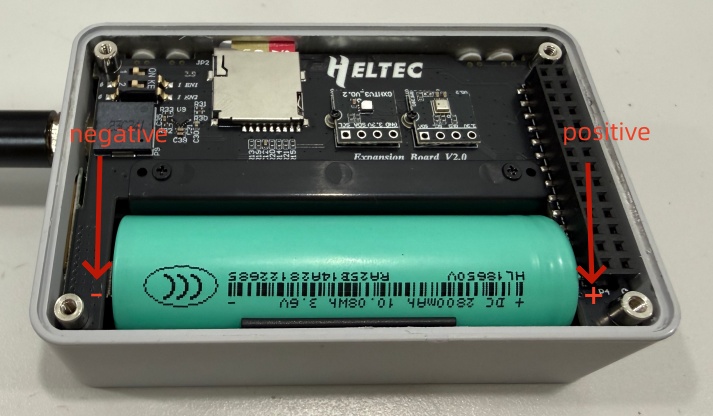
After removing the casing, you can install the battery. Battery type: 18650 flat-top lithium battery. Be careful not to reverse the positive and negative terminals.
Power On/Off
Press and hold the Power button for 3 seconds to turn the device on or off.
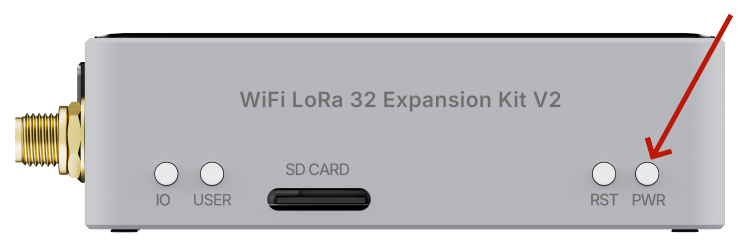
If the device is powered off and connected to USB power, the screen will automatically turn on. When the USB cable is disconnected, the screen will turn off. The device remains powered off and must be powered on manually for normal operation.
Charging
You can power or charge the device via the USB-C port. The applicable voltage is 5V.
If the screen flickers during use, it may be caused by a low battery level. Charge the device to restore normal screen operation.
Insert the SD card
If an SD card is required, insert it as shown in the diagram, ensuring it is oriented correctly to avoid incorrect insertion.
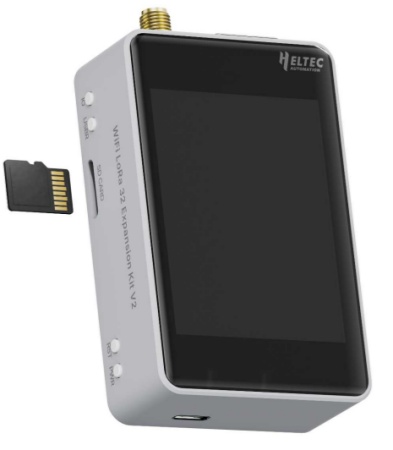
Before use, make sure the SD card is formatted as exFAT.
Flash Firmware
We recommend using the Flash Download Tool to flash the firmware.