Glass Panel (0.96-OLED) Version Meshtastic Guide
warning
For hardware version V4.3, please use firmware version 2.7.20 or above.
Firmware Flashing
Web Flasher
- Enter Bootloader mode
Since the CP2102 has been removed in the V4 version, you must enter Bootloader mode when flashing the firmware. The method is as follows:
- Connect the USB-C cable.
- Press and hold the USER button, press the RST button once, then release the USER button
-
Go to the Meshtastic Web flash page: https://flasher.meshtastic.org/
-
Select Heltec V4, choose the firmware version, and start flashing.
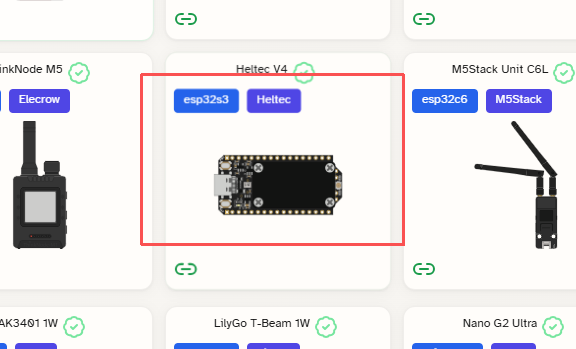
Flash via ESP32 Flasher Tool
- Firmware address:
- For usage instructions, please refer to this link: How to use ESP32 Flash Tool
Power up
Press and hold the "PWR" button for 3 seconds to activate the battery function.
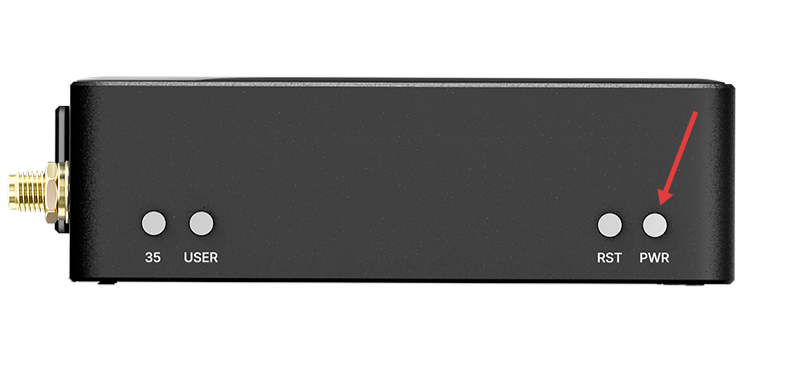
Button
- PWR: Press and hold for 3 seconds to power the device on or off.
- RST: Reset
- USER
- Single press: Next option, Wake
- Long press 2 seconds: Enter or select the current option.
- Long press and hold for 5 seconds, then release: Shutdown
- 35: Custom key
For more information, please refer to the official Meshtastic documentation: https://meshtastic.org/docs/introduction/